The Chief of Staff Tech Stack: Essential Tools for 2026
When I started as Chief of Staff at my first startup, the CEO handed me a laptop and said: "Figure out how to keep this place running."
No playbook. No training. No list of tools I needed.
So I did what every new Chief of Staff does: I cobbled together a franken-stack of tools, half of which I paid for out of pocket because I didn't want to wait for procurement approval.
Five years and three Chief of Staff roles later, I can tell you exactly which tools actually matter—and which ones are just expensive distractions.
Why most Chiefs of Staff are using the wrong tools
The problem with being a Chief of Staff is that your job doesn't fit into any standard software category.
You're not: - A project manager (though you manage projects) - An executive assistant (though you handle logistics) - A consultant (though you solve strategic problems) - An analyst (though you work with data)
You're all of these things and none of them.
So when you go looking for tools, you end up with: - Too many tools (because each job function has its own software) - The wrong tools (because tools built for PMs or EAs don't solve CoS problems) - Expensive tools (because you're buying enterprise software for functions you only do 20% of the time)
The result: you're spending $500/month on tools and still doing most of your work in Google Docs and Slack.
The six functions of a Chief of Staff (and the tools that actually help)
After five years in the role, I've distilled the Chief of Staff job into six core functions. Here's what you actually need for each one:
1. Information Aggregation: Collecting updates from across the organization
What you're doing: - Weekly status updates from department heads - Monthly board deck preparation - Quarterly business reviews - Ad-hoc "what's the status of X?" questions from the CEO
The wrong tools: - Asana/Monday/ClickUp: Built for project management, not organizational synthesis - Google Forms: Feels like homework for department heads - Email: Updates get lost, inconsistent formats, no version control
The right tools: - Dotted Roll-Up ($20-40/mo): Pulls status from Jira, Slack, Notion automatically and drafts roll-ups. Built specifically for this. (Full disclosure: I built this after dealing with this problem for years.) - Notion ($8-15/user/mo): If you need flexibility and your org is all-in on Notion, this can work. But requires manual updates from teams. - Confluence ($5-10/user/mo): If you're in the Atlassian ecosystem.
My recommendation: - < 50 people: Notion + weekly standup notes - 50-200 people: Dotted (automates the aggregation so you spend time on synthesis) - 200+ people: Dotted + Confluence (for documentation)
2. CEO Leverage: Managing the CEO's time, priorities, and decisions
What you're doing: - Managing CEO's calendar and meeting prep - Tracking open decisions and follow-ups - Preparing briefing docs for key meetings - Acting as proxy when CEO can't attend
The wrong tools: - Generic task managers: Don't capture context or urgency - Email folders: Things get lost - Spreadsheets: Too manual, no notifications
The right tools: - Motion ($34/mo): AI-powered calendar and task management. Automatically schedules CEO's priorities around meetings. Best tool I've found for CEO time management. - Notion (already paying for it): Create a CEO dashboard with open decisions, upcoming meetings, and follow-ups. Keep it simple—one page the CEO actually looks at. - Calendly ($10-15/mo): For external meeting scheduling. Takes the back-and-forth out of booking time with the CEO.
My recommendation: - Motion for CEO task/calendar management - Notion for the "CEO dashboard" (decisions pending, strategic initiatives, key metrics) - Calendly for external scheduling
3. Strategic Projects: Running company-wide initiatives that don't fit anywhere else
What you're doing: - Compensation review and leveling - Fundraising prep and investor updates - Office expansion or remote strategy - M&A due diligence - Organizational design and restructuring
The wrong tools: - Generic project managers: Too heavyweight for one-off projects - Email and Slack threads: Things get lost - Google Docs with action items: No one looks at them
The right tools: - Linear ($8-14/user/mo): Best tool for strategic projects. Clean, fast, integrates with everything. Originally built for engineering but works perfectly for any project work. - Airtable ($20-45/user/mo): If your projects involve complex data or need custom views. Overkill for most CoS work but powerful when you need it. - Google Docs + Slack: Sometimes simple is better. One doc per project, pin to relevant Slack channel.
My recommendation: - < 100 people: Google Docs + Slack (don't overthink it) - 100+ people: Linear (when you're running 5+ strategic projects simultaneously)
4. Meeting Management: Running leadership offsites, quarterly planning, all-hands
What you're doing: - Quarterly leadership offsites - Monthly all-hands meetings - Board meetings and prep - Executive team weekly syncs
The wrong tools: - PowerPoint/Google Slides for everything: Takes forever to build, terrible for collaboration - Zoom recordings with no follow-up: No one watches them - Email summaries: Get ignored
The right tools: - Gamma ($15-40/mo): AI-powered presentation builder. Creates beautiful decks in minutes. Great for offsites and all-hands. - Fellow ($6-10/user/mo): Meeting agendas, notes, and action items in one place. Integrates with calendar. Keeps meetings accountable. - Miro ($8-16/user/mo): For workshops and collaborative offsites. Best virtual whiteboard tool. - Donut (Free-$4/user/mo): Slack app for virtual coffee chats and team connection. Essential for remote/hybrid teams.
My recommendation: - Gamma for presentations (way faster than PowerPoint) - Fellow for recurring meetings (leadership team sync, exec reviews) - Miro for offsites (strategy sessions, brainstorming)
5. Internal Communications: Keeping the company aligned on strategy, updates, and culture
What you're doing: - Weekly company updates (usually on behalf of CEO) - Quarterly strategy communications - Organizational announcements (hires, promotions, departures) - Culture initiatives and employee engagement
The wrong tools: - Email: Gets ignored or buried - Slack announcements: Scrolls away in 5 minutes - All-hands meetings only: Information density is too low
The right tools: - Slite ($8-12/user/mo): Company handbook and knowledge base. Replaces the "where did we document that decision?" problem. - Loom ($12-30/user/mo): Record async video updates. Way more engaging than email. - Slack (already paying for it): Use it intentionally. Create #company-updates channel, post consistently, pin important things. - Culture Amp or Lattice ($5-11/user/mo): For engagement surveys and pulse checks. Only if you're 100+ people.
My recommendation: - < 50 people: Slack + Loom (keep it simple) - 50-200 people: Add Slite for the handbook - 200+ people: Add Culture Amp for engagement
6. Data & Insights: Answering "how are we doing?" questions with actual data
What you're doing: - Weekly/monthly metric reviews - Dashboard for CEO and board - Ad-hoc analysis ("why did churn spike?") - Benchmarking against competitors or industry
The wrong tools: - Excel/Sheets only: Manual, error-prone, not real-time - Tableau/Power BI: Overkill and expensive for most startups - Looker: Requires data team to set up and maintain
The right tools: - Hex ($49-119/user/mo): Collaborative data notebooks. SQL + Python + visualization in one place. Best tool for Chiefs of Staff who need to analyze data but aren't data scientists. - Metabase (Open source or $85/mo hosted): Simple, clean dashboards. Great for standard metrics (MRR, churn, runway). - Rows ($29-79/mo): "Spreadsheets with superpowers." Pulls data from APIs directly into spreadsheets. Good middle ground.
My recommendation: - < 100 people: Rows or Google Sheets with Zapier integrations - 100+ people: Metabase for dashboards, Hex for analysis
The minimal viable Chief of Staff tech stack
If you're a new Chief of Staff and need to pick tools today, here's what I'd recommend:
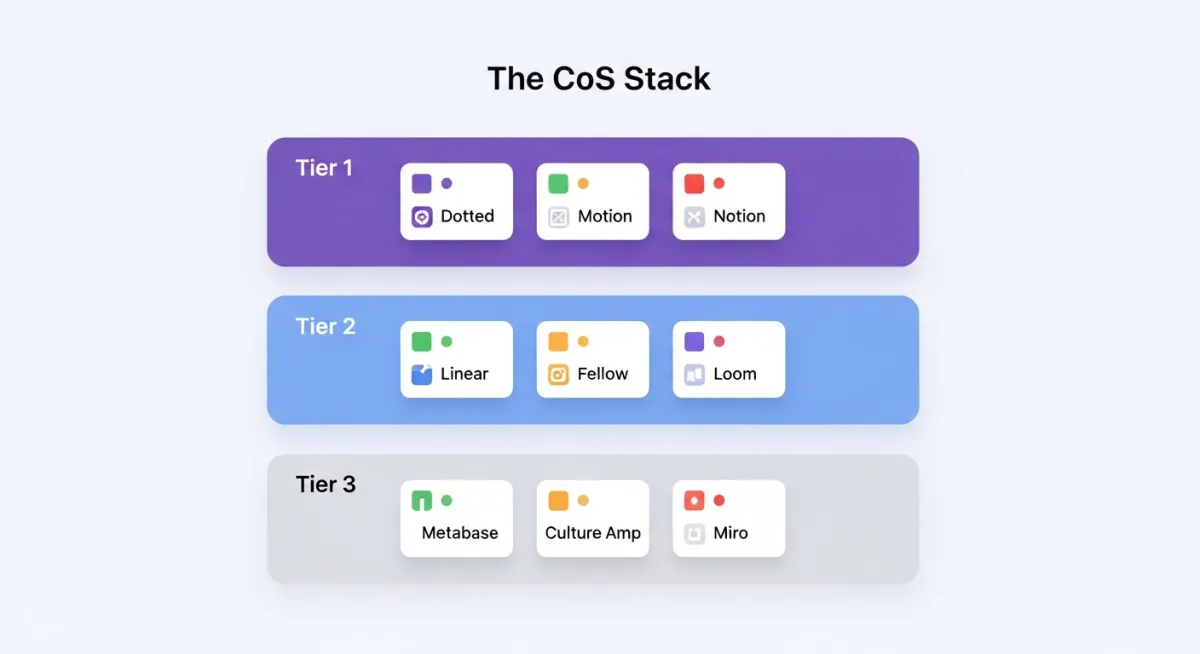
Tier 1: Can't live without these ($85-135/month total)
- Dotted Roll-Up ($20-40/mo) - Information aggregation and status reporting
- Motion ($34/mo) - CEO calendar and task management
- Notion ($15/mo for small team) - CEO dashboard, documentation, strategic project tracking
- Slack (Already have it) - Communications backbone
- Google Workspace (Already have it) - Docs, Sheets, Slides
Total: $69-89/month + Google Workspace
This covers 80% of your core work.
Tier 2: Add these when you're scaling (50-200 people)
- Linear ($8-14/user/mo for 5 users = $40-70/mo) - Strategic project management
- Fellow ($6-10/user/mo for 10 users = $60-100/mo) - Meeting management
- Loom ($12/mo) - Async video updates
- Slite ($8/user/mo for 50 users = $400/mo) - Company handbook
Total additional: $512-582/month
Tier 3: Add these at 200+ people
- Metabase ($85/mo) - Dashboards
- Culture Amp ($5/user/mo for 200 = $1,000/mo) - Engagement
- Miro ($8/user/mo for 20 users = $160/mo) - Workshops
Total additional: $1,245/month
The tools that don't make the list (and why)
Here are popular tools that Chiefs of Staff often buy but don't actually need:
❌ Asana/Monday.com/ClickUp
Why not: Built for project managers managing many small tasks. As CoS, you're managing a few big strategic projects. These tools are overkill and distract you with features you don't need.
Use instead: Linear (for strategic projects) or just Google Docs (for one-off initiatives).
❌ Zapier (for most use cases)
Why not: You end up spending hours building and maintaining workflows that break constantly. Unless you have technical skills, it's a timesink.
Use instead: Tools that have native integrations (like Dotted pulling from Jira/Slack automatically).
❌ Superhuman/Hey/Front
Why not: Email clients that cost $30/mo and don't solve the real problem (too much email). You need better systems, not better email software.
Use instead: Gmail with good filters and a commitment to getting out of email.
❌ Roam Research/Obsidian
Why not: Great for personal knowledge management. Terrible for organizational work where others need access. Your notes die in your personal vault.
Use instead: Notion (for shared knowledge) or Apple Notes (for personal quick capture).
❌ Salesforce/HubSpot (as the CoS)
Why not: You shouldn't own the CRM. Sales should. You should be able to pull data from it, but buying and maintaining a CRM is not a CoS responsibility.
Use instead: Get read access to whatever the sales team uses.
How to evaluate tools as a Chief of Staff
Before you buy any tool, ask these three questions:
1. "Does this replace manual work I do every week?"
If the tool automates something you currently do manually (like aggregating status updates or scheduling meetings), it's worth it.
If the tool is aspirational ("I should be doing X but I'm not"), skip it. Fix your process first, then tool it.
2. "Will the team actually use it?"
The best tool is worthless if no one adopts it.
Before buying: - Check if it integrates with tools the team already uses (Slack, Google Workspace) - Confirm it doesn't require behavior change ("everyone needs to log their updates in this new system") - Make sure it's simple enough that you can onboard people in 5 minutes
3. "Is this a 'nice to have' or 'can't live without'?"
Chiefs of Staff have limited budget. Be ruthless.
Can't live without: - Tools that save you 5+ hours/week - Tools that prevent major failures (like missing a board deadline) - Tools the CEO explicitly asks for
Nice to have: - Tools that make something slightly better - Tools you saw at a conference and thought were cool - Tools with features you "might use someday"
If it's "nice to have," wait 3 months. If you're still thinking about it, then buy it.
My actual tech stack (and what it costs)
Here's what I currently use for Dotted (we're a 15-person company):
| Tool | Cost/Month | Why I Use It |
|---|---|---|
| Dotted | $0 (our product) | Status aggregation, board deck prep |
| Linear | $140 (10 users) | Product roadmap, strategic projects |
| Notion | $150 (15 users) | Documentation, company handbook, meeting notes |
| Slack | $550 (15 users) | Team communication |
| Motion | $34 (just me) | My calendar and task management |
| Loom | $30 (3 creators) | Async updates and demos |
| Google Workspace | $180 (15 users) | Email, docs, sheets |
| Metabase | $85 | Dashboards for metrics |
Total: $1,169/month for 15 people = $78/person/month
What I explicitly don't use: - Asana/Monday (too heavyweight) - Zapier (too much maintenance) - Superhuman (Gmail works fine) - Miro (we're remote-first, don't workshop enough to justify it)
Three mistakes I made building my tech stack
Mistake #1: Buying tools before defining the process
My first month as CoS, I bought Asana because "that's what project managers use."
I spent a week setting up workflows, templates, and automations. The team used it for two weeks and then went back to Slack and Google Docs.
Why it failed: I hadn't figured out how we actually worked. I was forcing a process onto the team instead of finding tools that fit our existing process.
The lesson: Define your workflow first. Then find tools that support it. Not the other way around.
Mistake #2: Building Franken-stacks with Zapier
I thought I was being clever: "I'll just connect all our tools with Zapier and build a custom workflow!"
Three months later, I had 40 Zaps. Half of them were broken. I spent 2 hours/week debugging why data wasn't syncing.
Why it failed: Zapier is great for simple automations. But complex workflows require constant maintenance. I became a system administrator instead of a Chief of Staff.
The lesson: Use tools with native integrations. Don't build your own integration layer unless you have dedicated eng resources.
Mistake #3: Optimizing my personal productivity instead of org productivity
I bought Superhuman ($30/mo), Roam Research ($15/mo), and Raycast Pro ($8/mo) because they made me feel efficient.
But my job wasn't to process email faster. My job was to keep the organization aligned.
Why it failed: I was optimizing the wrong thing. My bottleneck wasn't my personal productivity—it was getting information from teams and synthesizing it for leadership.
The lesson: Optimize for the work that matters. If your job is organizational alignment, buy tools that help with that. Not tools that make you personally faster at low-value work.
Three things to do this week
1. Audit your current spending
List every tool you're currently paying for (personally or from the company). For each one, ask: - Do I use this weekly? - Does it save me more than 1 hour/month? - Would I be significantly worse off without it?
If the answer to any of these is "no," cancel it.
2. Identify your biggest time sink
Where do you spend the most manual, repetitive time? - Building the board deck? - Chasing status updates? - Scheduling meetings? - Analyzing data?
Pick one. Find a tool that automates it. Buy it this week.
3. Start a "Tools to Evaluate" list
When you see a tool that looks interesting, don't buy it immediately. Add it to a list.
Wait 30 days. If you're still thinking about it, schedule a 2-week trial.
Most tools you add to the list, you'll realize you don't actually need.
Building a tech stack as a Chief of Staff is uniquely frustrating because no single tool is designed for the breadth of what you do. If you're piecing yours together right now and want a second opinion, reply here — I've made every mistake in the book so you don't have to.
Dotted is the reporting and roll-up layer I wish I'd had in my CoS days. See how it fits into your stack at trydotted.com
